Agents
Sub-agents
The sub-agent tool enables your agent to delegate specialized tasks to existing
agents, reducing load and context bloat in the main agent. Think of sub-agents
as isolated domain experts that the parent agent can invoke independently for
specific tasks. A sub-agent is a reference to another agent by its agent_key.
You create those agents first, and then add them as sub-agents.
This approach is especially useful when tasks require distinct expertise or
when a single agent becomes too complex. When you add a sub-agent, you define
its purpose in the sub-agent tool description, or in the main agent instructions.
The main agent passes input to the sub-agent. To share a parent-session artifact,
the call must explicitly include it in the artifacts array with its
artifact_id and a purpose explaining why the sub-agent needs it.
Each sub-agent has its own tools and instructions. The events it retains depend
on the configured session mode: ephemeral starts fresh, while the resumable
modes can retain earlier context. The sub-agent completes its task before
returning a result to the main agent.
Use sub-agents when tasks benefit from specialized instructions and tools. For example, a document processing system might delegate legal review, technical accuracy checks, and content reformatting to separate sub-agents, since each task requires different expertise.
Try our Sub-agents Jupyter notebook to build a research assistant with three specialized sub-agents. To run a deterministic fan-out through one composable lambda, follow Build a parallel sub-agent fan-out.
Agent key
The agent_key uniquely identifies an agent. A parent agent needs this value to
reference and invoke specific agents as subagents. You can get the
agent_key from the Agents List (UI)
or the List Agents endpoint (API).
How sub-agents work
When a parent agent invokes a sub_agent tool:
- The sub-agent tool creates a new session, or resumes a previous one using a
session_key. - The sub-agent tool calls the referenced agent (identified by
agent_key) with the input message:- The sub-agent processes this request using its own instructions, tools, and memory.
- The sub-agent can only access its own tools.
- The parent agent cannot access the sub-agent's tools.
- The sub-agent tool returns the
session_keyandsub_agent_response(the sub-agent's final output) to the parent agent.
For more information about sub-agents architecture and how they work, see our blog.
- The sub-agent tool result contains the sub-agent's final response. The
sub-agent's inner events are relayed to the parent as
tool_activityevents on streaming responses only; they are not stored and are not part ofsub_agent_response. Ensure that you write sub-agent instructions so that the final message is self-contained. - Sub-agents operate in isolated workspaces. They do not share memory, session
history, or tool state with the parent. Parent-session artifacts are available
to the sub-agent only when explicitly included in the call's
artifactsarray. Artifacts in the sub-agent session are copied into the parent session automatically after the call.
Add a sub-agent with the UI
The easiest way to add a subagent is with the UI when you create or update an agent.
- In the agent creation wizard, go to the Tools tab.
- Click Add tool.
- Find the Sub Agent tool in the list.
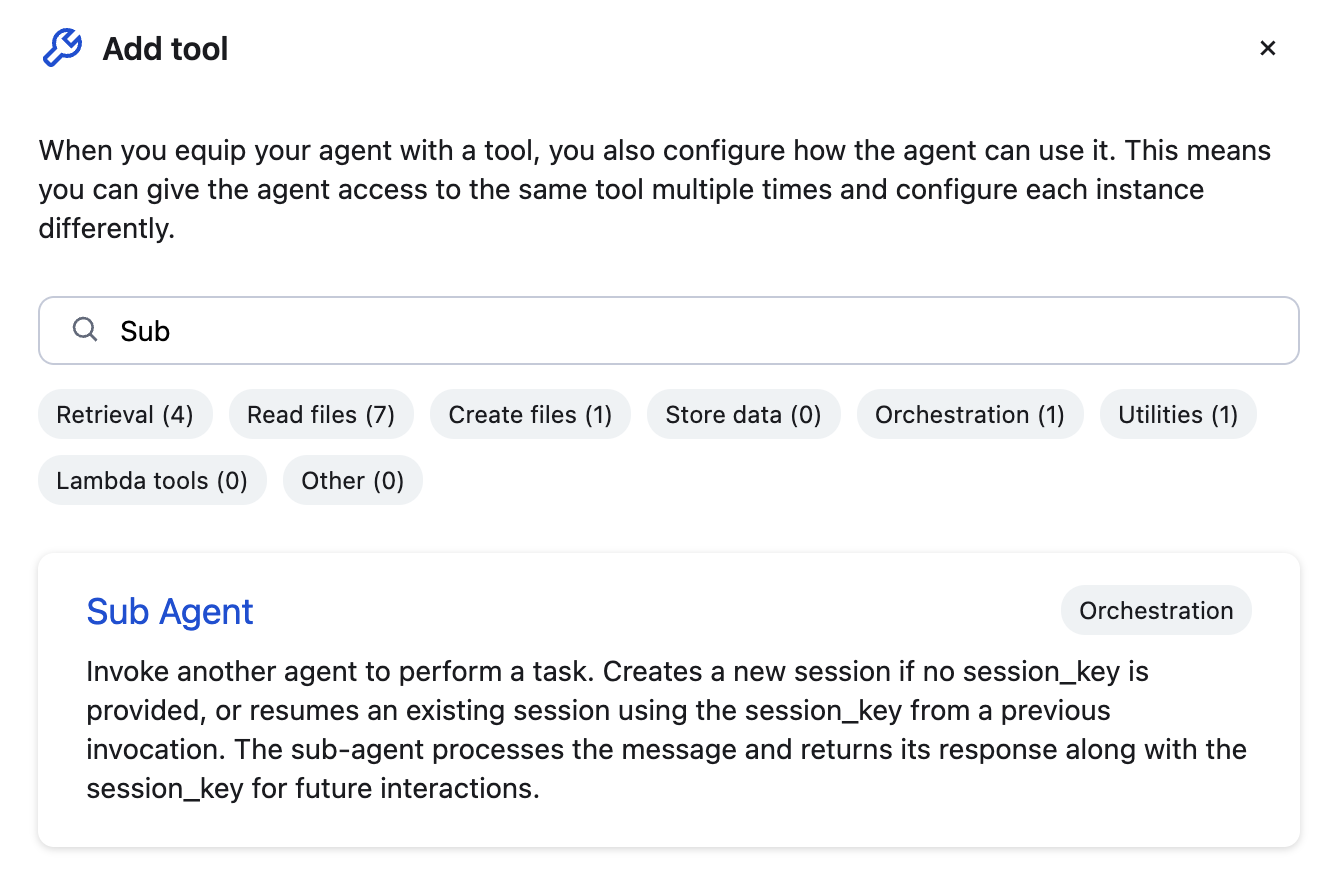
- Enter a name for your sub agent, add a description, and enter the
agent_key. You can get this value from the Agents List (UI).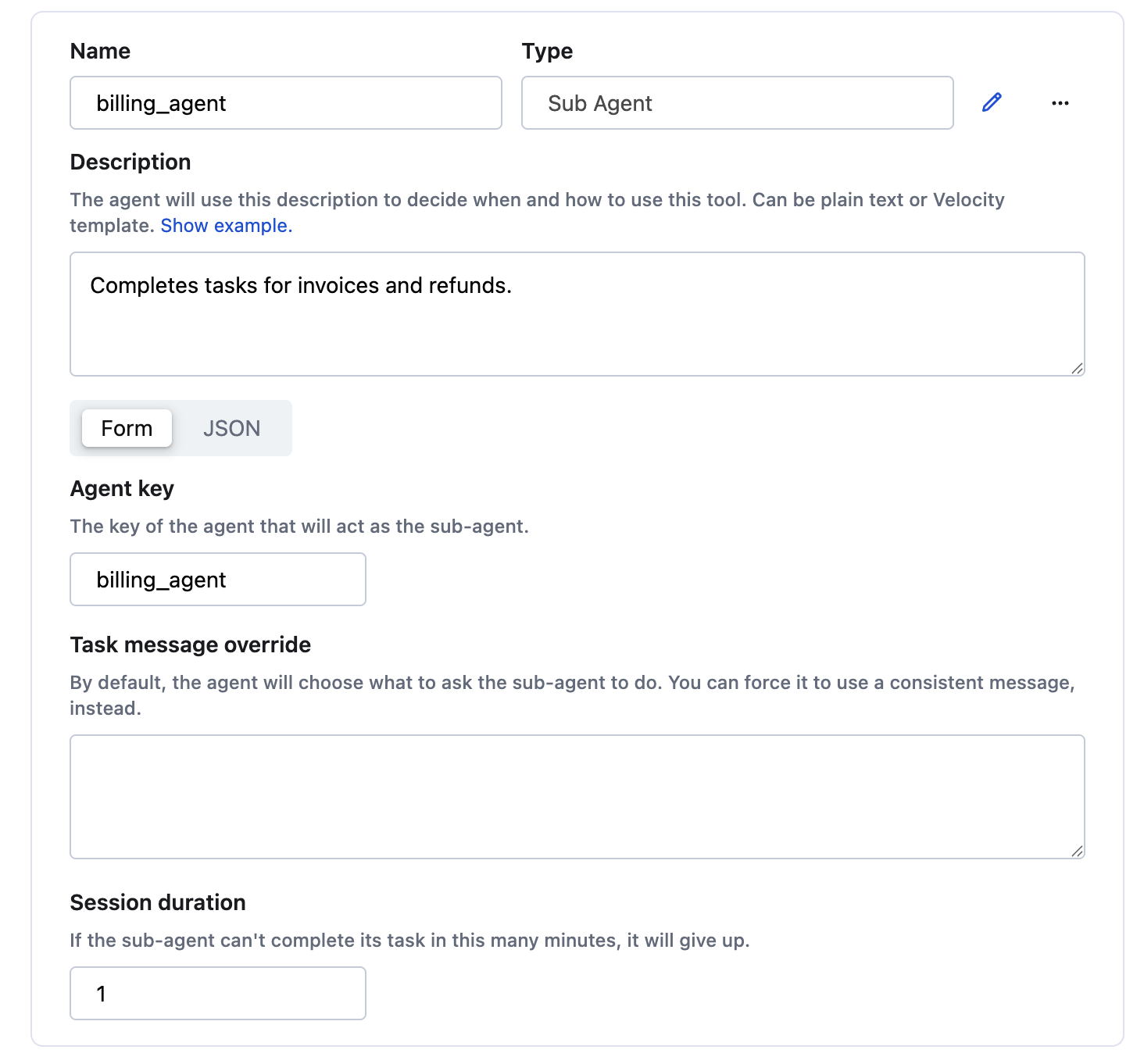
- Click Update agent.
Configure a sub-agent tool
You can also configure the sub-agent tool inline with the API. The
configuration defines which agent to invoke (agent_key), optional session
behavior, and optional argument_override. You can get the agent_key value from
the List Agents endpoint (API).
argument_override lets you hardcode values for fields exposed to the LLM of the
sub-agent tool (message and session_tti_minutes). The LLM cannot modify
overridden fields or see the values that were supplied.
You can also use dynamic references inside argument_override. These values are
resolved at runtime using $ref syntax and can read from:
session.metadata.*agent.metadata.*agent.secrets.*— encrypted, masked values managed under Agent secrets.
Session modes
The sub-agent tool supports five session modes that control whether sessions are resumed or created fresh each time:
ephemeral: (Default) Creates a new session on every invocation and never resumes an earlier session. Use this for strict isolation and for parallel calls through the same sub-agent configuration.persistent: Reuses one session per parent-session and tool-configuration pair, created on the first invocation. Two persistent configurations on the same agent keep separate sessions.session_scoped: Resumes the session identified by a previously returnedsession_key, when supplied; otherwise creates a new session. Only the parent session that created that sub-agent session can resume it.agent_scoped: Likesession_scoped, but any session belonging to the agent that created the sub-agent session can resume it.llm_controlled: Deprecated alias forsession_scoped. Usesession_scopedfor new agents.
For parallel fan-out through one sub-agent configuration, use ephemeral.
persistent sends concurrent calls into the same session, and reusing one
session_key with session_scoped or agent_scoped has the same effect. See
Parallel sub-agent fan-out.
Invoke a sub-agent
After configuring a sub-agent tool, the parent agent can invoke it by passing a
task message. The sub-agent tool then calls the referenced sub-agent with this
message. The message field is exposed to the LLM and defines the specific
task the sub-agent must perform.
Session management
Each sub-agent invocation returns its session_key. In session_scoped,
agent_scoped, and the deprecated llm_controlled mode, pass that exact value
back to resume the corresponding session; omit it to create a new session.
Session keys cannot be invented or chosen.
persistent manages its session key automatically and reuses one session per
parent-session and tool-configuration pair. ephemeral always creates a new
session, regardless of earlier calls.
Session ownership is enforced according to the configured mode. A
session_scoped session can be resumed only by the parent session that created
it. An agent_scoped session can be resumed by any session of the creating
agent.
Artifact sharing
Parent agents share artifacts explicitly through the sub-agent call's
artifacts array. Every entry requires the artifact ID and a short explanation
of why the sub-agent needs it:
{
  "message": "Analyze the attached Q4 report.",
  "artifacts": [
    {
      "artifact_id": "art_report_pdf_a3f2",
      "purpose": "This report contains the Q4 financial data to analyze."
    }
  ]
}
The parent must own every artifact before sharing it. If an artifact does not exist in the parent's workspace, the call returns an error.
After each call, all artifacts in the sub-agent session are copied into the parent session automatically. This copy-back needs no additional configuration.
Sub-agent patterns
Single task: Use when tasks do not require any context to carry over.
Single task
Code example with json syntax.1
Resume a session-scoped sub-agent: Use the exact session_key returned by a
previous invocation when a task has multiple steps, such as iterative review or
content generation.
Resume a session-scoped sub-agent
Code example with json syntax.1
Multiple specialized sub-agents: Assign different sub-agents for a variety of tasks.
Multiple specialized sub-agents
Code example with json syntax.1
Example: Inline code review sub-agent
Inline code review sub-agent
Code example with curl syntax.1