Version: 2.0

Build with io

io is Vectara's AI assistant for building with the platform. It is available in the Vectara Console and as the @vectara/io command-line interface (CLI). Describe what you want in plain language, ask questions about your account or Vectara APIs, and move from an idea to an editable agent draft.

Both surfaces use the same io agent definition and the same public Vectara REST API v2. Console io works inside the visual workspace. The CLI provides a streaming terminal interface, local file workflows, browser previews, and non-interactive automation.

io is designed to help you become effective across the Vectara platform, regardless of your level of expertise or familiarity with the platform. It helps you scope an agent, choose an existing corpus, inspect available resources, propose related setup, and open supported resources in the workspace.

io does not create or update resources without your approval. For agent-building requests, io proposes a draft and shows a confirmation card before anything is created. You can review the generated configuration, fix missing fields, and choose when to save. The only way to grant that approval ahead of time rather than per change is an unattended terminal run, described in Running io unattended.

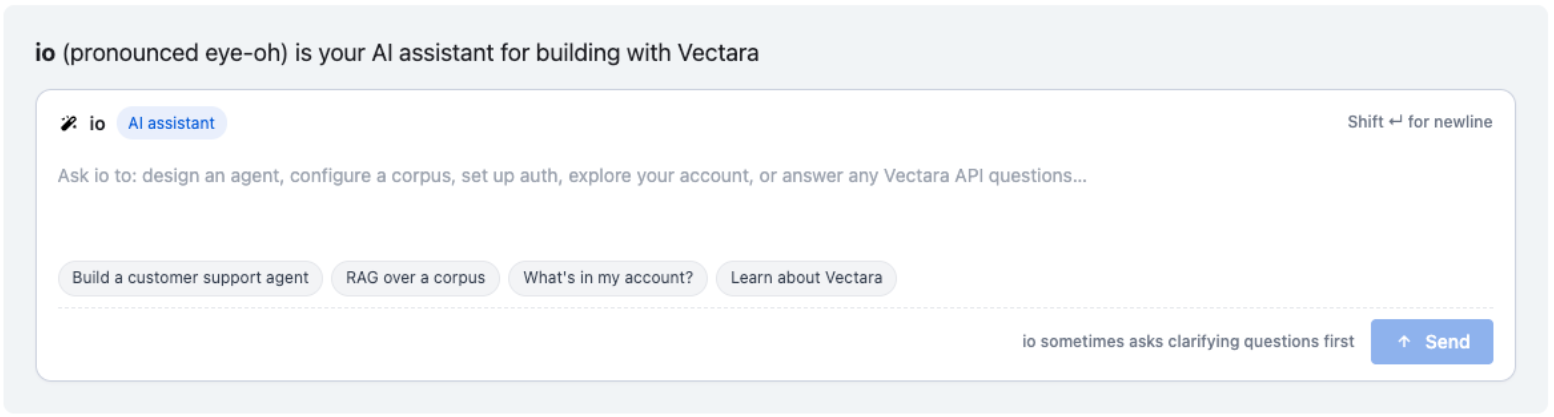
Vectara Console showing the io agent panel and starting options.

What io can help with

io can do more than draft agents, but the behavior differs by request type.

RequestBehavior
Build an agentio asks clarifying questions and proposes an editable agent draft you review and save.
Create and edit resourcesio can create and edit resources across the platform, such as agents, pipelines, and API keys.
Inspect your accountio can report existing agents, corpora, and tools, and answer questions about your account.
Configure a corpusio can propose a corpus configuration starting point. To answer over your own content, you need a corpus with indexed data.
Answer API and product questionsio can explain how Vectara works and show API concepts and examples. Verify generated request and response fields against the API reference before production use.
Troubleshootio can help debug performance problems.
View usage metricsIn Console, io can return a card that opens live charts for catalog metrics, a time range, and an optional agent scope. In the CLI, io prints the metric summary and a Console link for viewing the charts.
Navigate the workspaceio can open supported resources in workspace tabs.

For example, you might ask io to set up a scheduled pipeline that ingests your docs into a corpus, investigate how an agent answered a recent query, or design an agent that uses memory across conversations.

tip

Ask io directly to tell you what it can help with.

Review what io creates

When io is ready to create an agent, it asks you to confirm first. From the confirmation card you can Open in editor to review and adjust before saving, Apply to create the agent directly, or Cancel to dismiss.

io's confirmation card to create the agent, with View proposed body, Cancel, Open in editor, and Apply.

Opening the agent draft in the editor helps you review every section under Configure before an agent is saved.

Generated agent draft open in the Configure editor, showing the General section with Name, Key, and Description.
SectionWhat to verify
GeneralConfirm the Name, Key, and Description. The key identifies the agent in API paths and cannot be changed after the agent is created.
ModelConfirm the Model name and JSON Parameters. io selects a model for the draft. Change it if your quality, latency, or cost requirements differ.
Tools and skillsConfirm each tool points to the intended resource. For a retrieval agent, open the Corpora Search tool and confirm the correct corpora are selected.
Steps and instructionsRead the generated instructions. Confirm they reflect the source policy, tone, citation behavior, escalation behavior, and behavior for missing answers.
RemindersAdd reminders only if the agent needs guidance reinforced on every turn.
AdvancedReview metadata, compaction, structured output, and other lower-level settings if your workflow depends on them.

You can also click Edit JSON to inspect the generated agent definition. Use the editor sections for routine review because they expose validation errors and missing fields.

Save, preview, and operate the agent

Click Save when the draft is correct.

Until you save a new draft, the runtime tabs are unavailable. The Console shows messages such as "Save the agent to start previewing it" on the Preview, Schedules, Connectors, and Secrets tabs.

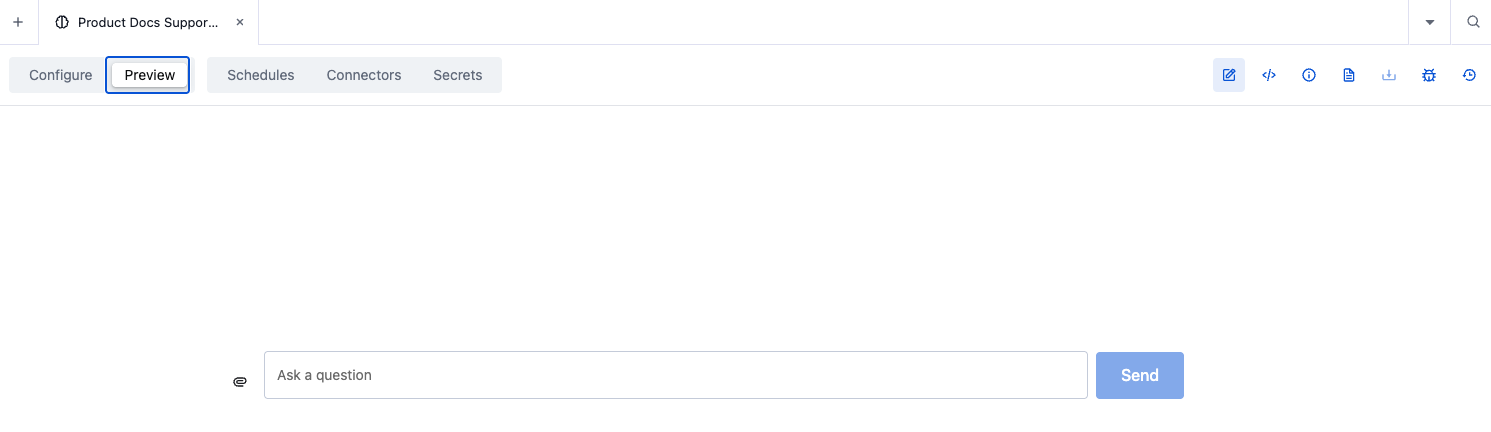
After saving, open Preview and ask a question.

Saved agent Preview tab with the Ask a question input and Send button.

The agent uses the intended corpus and tools, follows the generated instructions, handles missing information the way you specified, and returns citations when your workflow requires them. If a response is wrong, return to Configure, adjust the model, tools, or instructions, and Save again before retesting.

Use the runtime tabs to finish setup:

TabUse it to
SchedulesCreate recurring agent runs.
ConnectorsConnect the agent to supported external systems.
SecretsAdd encrypted credentials for tools.

Tools reference an agent secret from argument_override with {"$ref": "agent.secrets.<name>"}. If a tool calls an external service, add and verify the required secret after the agent is saved; io does not supply it for you.

Use io from the terminal

io also runs in a terminal as @vectara/io, against the same agent definition and the same public Vectara REST API v2 as Console io. Reach for it when you want to build from a shell, keep generated files under version control, or run io unattended in a script.

npm install -g @vectara/io
io login
io

Node.js 20 or later is required, along with network access to your deployment's REST API v2 endpoint. Inside a session, /help lists the slash commands and io --help lists the flags; esc cancels the in-flight request and ctrl-c twice exits.

Scope the CLI API key

The CLI provisions its own agent, io-assistant-cli, on your tenant rather than modifying the Console's io-assistant, and stores the API key you supplied as one of that agent's encrypted secrets. Every action io takes in the terminal uses that key's permissions.

warning

Scope the API key to what you intend io to change, and treat the CLI agent as a privileged resource: anyone who can invoke it can ask it to attempt any operation the key allows. See API key management for narrowing a key by role.

Review a proposed change

In the terminal, as in the Console, io proposes a change and you approve it before the write executes. For an agent update, the proposal is a partial change set applied by PATCH /v2/agents/{agent_key}, not a full replacement.

The agent update containsEffect on the live agent
An omitted top-level fieldPreserved. io does not need to restate what it is not changing.
null for a nullable fieldCleared or reset as documented by the Update agent operation. A non-nullable field rejects null.
null for one entry in tool_configurations, skills, or stepsDeletes only that named entry.
null for the entire tool_configurations, skills, or steps mapClears the entire map.

On a card that removes a tool, skill, or step, confirm that the proposal sets the intended named entry to null rather than clearing the whole map.

caution

Some cards show no diff at all. A create has no prior state to compare against, and if io cannot read the live resource first, the card falls back to the raw proposed body. A missing diff is not evidence of a small change — read the body before approving.

Approving prints a Console deep link to the affected resource, which is the fastest way to confirm the write landed as you read it.

Answer clarifying questions

Clarifying questions arrive as a picker with io's own recommendation already selected, so pressing enter accepts io's judgment rather than expressing yours. Press t to type an answer instead whenever the recommendation is not obviously right.

This matters more in print mode (io -p), which cannot wait for you. If io marked a recommended option, print mode takes it and continues; if not, io proceeds on its own judgment. Either way an unattended run can pass a decision point you never saw, so treat print-mode output as an answer to the question io settled on.

Running io unattended

Print mode sends the final answer to standard output and progress to standard error, so a script can consume one without parsing the other:

io -p "list my corpora"

Writes are rejected unless you pass --auto-approve, and provisioning the CLI's own agent counts as a write. When the CLI needs provisioning or credentials it exits 2 rather than failing the request with 1, which lets a script tell setup problems apart from a genuine error.

A CLI upgrade can revise the bundled agent definition, and the CLI treats a stale definition as needing an update. A scheduled job that worked yesterday can start exiting 2 after a routine npm update. Run io bootstrap once after upgrading, or accept provisioning in the job itself.

danger

--auto-approve also approves provisioning. If an agent already exists at the target key and is not a CLI-provisioned io agent — a foreign agent, or the Console's own io-assistant — provisioning overwrites its definition instead of stopping, and you are told only afterward. Without --auto-approve the CLI refuses and asks you to pick another key. Pass --agent-key deliberately.

Working with local files

/read uploads a file into the session and /paste uploads a clipboard screenshot, which is what makes prompts like "match the branding in this PDF" or "adapt this interface to the screenshot" work. Generated files land in your workspace directory — set by --workspace or IO_WORKDIR, falling back to the profile's work directory and then the current directory — so review and version them as you would any other source.

note

io cannot open an image larger than 2 MB, and the two upload paths handle that differently. /paste shrinks an oversized screenshot on macOS, stopping only if it still cannot get under the ceiling, and on other platforms stops immediately and asks you to resize the file first. /read uploads the file regardless and warns that io may fail to view it, so an oversized image can reach the session and only fail when io tries to look at it. Retina screenshots routinely exceed the limit.

Design a web app

io design generates a self-contained web application for one or more of your agents and iterates on it conversationally, serving the result locally with live reload. Join agent keys with +, such as io design support-bot+triage-bot, to build one application spanning several agents. The command registers a Vectara bring-your-own LLM configuration that uses the Anthropic API key you supply. The key is not stored locally, but the registration is tenant state.

warning

The registration is tenant-wide and carries a fixed name, so it is shared rather than personal. A second person on the same tenant is never prompted for a key and silently uses the existing registration, and io design logout deletes that registration for everyone using it, not just locally. Use io design rotate-key to replace the credential without removing it.

Your tenant must also be entitled to register a customer LLM. Without that entitlement the first io design fails and directs you to contact Vectara support to enable BYO-LLM.

Previewing an agent in a browser

io preview serves a minimal session page for an existing agent and proxies its requests through the local process, so your API key stays on your machine and never reaches the browser page.

note

The preview is deliberately local-only: it listens on the loopback interface and refuses requests that arrive under any other hostname. Sharing the URL with a colleague or exposing it through a tunnel returns a forbidden-host error rather than a working page. Use it to test an agent yourself, not to demonstrate one to someone else.

Deployment and LLM requirements

io depends on an LLM that can drive tool calls and follow its instructions reliably. An LLM being registered on your tenant does not by itself make it suitable, and behavior varies materially between models — review proposed configurations and validate generated agents against representative inputs rather than assuming parity.

On a self-managed or air-gapped deployment, confirm with your administrator that io is enabled for the environment, that an LLM capable of driving tool calls is configured for it, and that platform services can reach the deployment's API hostname. io reads and writes through the REST API, so it requires network access to that hostname from within the deployment.