API Key Management
API Keys allow controlled, anonymous access to several administrative tasks, indexing your data, and running semantic searches on your corpora. This greatly simplifies integration from public-facing systems like websites. You can easily create a Personal API key or an Index or Query API Key, and then simply embed the API key and directly pass it to when issuing requests. If a key is compromised, you can quickly revoke the key and replace it in minutes.
Vectara has three kinds of API keys:
Personal API Key
The Personal API Key helps developers in early stages of exploration and prototyping with Vectara. This method provides a straightforward getting started experience for integrating accounts with external applications without the complexity of OAuth authentication. You can use the Personal API Key when putting together a quick prototype, or if you are working on an integration that does not yet support OAuth 2.0.
The Personal API Key enables most administrative tasks including creating, deleting, and listing corpora, managing API keys for accessible corpora, reading usage data, updating corpora filters, executing queries, and indexing.
You cannot use a Personal API Key to delete an account, validate a registration, transfer account ownership, or access billing data.
A Personal API Key inherits the permissions of its associated user account. For example, a key generated by a billing admin will only possess billing admin-related permissions. Because of their broad access, treat Personal API Keys with the same caution as passwords.
Query API Keys
Query API Keys are recommended for read-only querying operations and are designed for embedding in code that runs in potentially insecure environments like web browsers or mobile apps. Query API Keys provide the least amount of risk because they have a limited scope and do not modify account data.
Index API Keys
Index API Keys offer a practical solution for development and testing phases for when you need read and write access. Because they also provide write access, Index API Keys are more powerful than Query API Keys and should be treated like passwords and used with caution in production environments.
Account owners are responsible for charges incurred through anonymous access to your account with any of these API keys.
🔒 Always keep your API Keys and OAuth tokens private. Do not share them through email, Slack, Discord, forums, or other public channels because it can lead to unauthorized access. Treat these keys with the same confidentiality as your personal credentials.
Use an API Key
To use a Personal, Index, or Query API key, pass it using the x-api-key
header request.
- JavaScript
- Python
- cURL
api_key_header = {
  "customer-id": CUSTOMER_ID,
  "x-api-key": API_KEY
}

data_dict = {
  "query": [
      {
          "query": "What is the meaning of life?",
          "num_results": 10,
          "corpus_key": [
              {
                  "customer_id": CUSTOMER_ID,
                  "corpus_id": CORPUS_ID
              }
          ]
      }
  ]
}
payload = json.dumps(data_dict)
response = requests.post(
  "https://api.vectara.io/v1/query",
  data=payload,
  verify=True,
  headers=api_key_header)
fetch("https://api.vectara.io:443/v1/query", {
headers: {
  "Content-Type": "application/json",
  "x-api-key": api_key,
  "customer-id": customer_id,
},
body: JSON.stringify({
  query: [
    {
      query: "What is the meaning of life?",
      num_results: 10,
      corpus_key: [{ customer_id: customer_id, corpus_id: corpus_id }],
    },
  ],
}),
method: "post",
})
.then((res) => res.json())
.then((data) => console.log(data))
.catch((error) => console.log(error));
curl -X POST \
-H "x-api-key: ${API_KEY}" \
-H "customer-id: ${CUSTOMER_ID}" \
https://api.vectara.io:443/v1/query \
-d @- <<END;
{
  "query": [
    { "query": "What is the meaning of life?",
      "num_results": 10,
      "corpus_key": [{"customer_id": ${CUSTOMER_ID}, "corpus_id": ${CORPUS_ID}}]
    }
  ]
}
END
Disable and Enable API Keys
To temporarily disable access to an API key, begin by visiting the API Keys screen. Select disable by clicking on the action menu (three dots) of the key you want to disable.
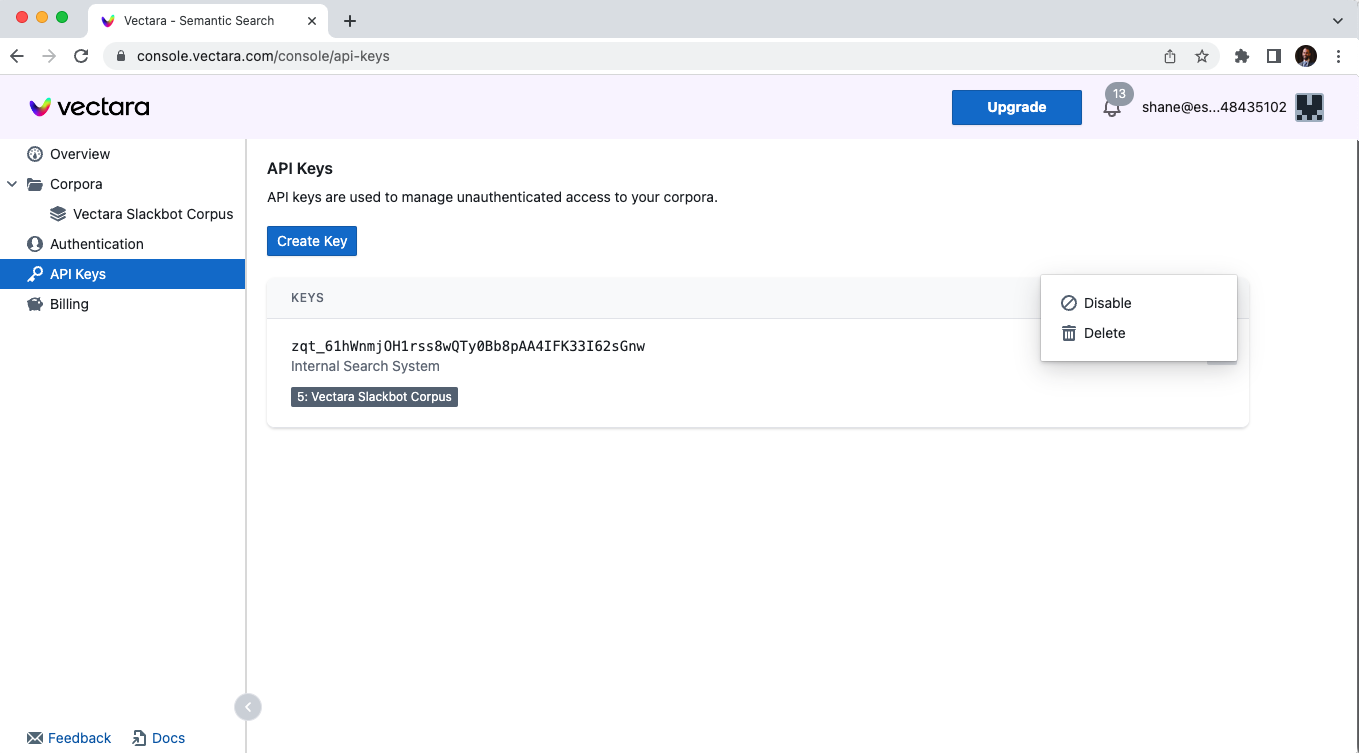
It will take around a minute for query requests using this key to be blocked.
Once disabled, a key can be reenabled through the action menu. It will take a minute or two before it can serve query traffic again.
Delete API Keys
A key may be permanently deleted through its action menu.
Once deleted, there is no way to undelete it, and all external systems that issue queries using the key will be blocked.